
This blog provides a detailed comparison of inventory valuation in Odoo 18 and Odoo 19, focusing on Stock Input, Stock Output, and Inventory Valuation accounts and their accounting impact. In Odoo 18, stock transactions move through separate interim accounts, which directly influence how accounting entries are recorded and tracked. In Odoo 19, the process is streamlined with a unified Stock Variation account, simplifying journal entry structure and account mapping. The new Review menu in Accounting introduces structured reports like Bills to Receive and Invoices to be Issued, offering clearer visibility over pending transactions. The flows are explained step-by-step to highlight the operational and reporting differences between both versions.
Stock Valuation Configuration in Odoo 18 and Odoo 19
The inventory valuation configuration has been changed in Odoo 19. Please see below to understand the updated flow-
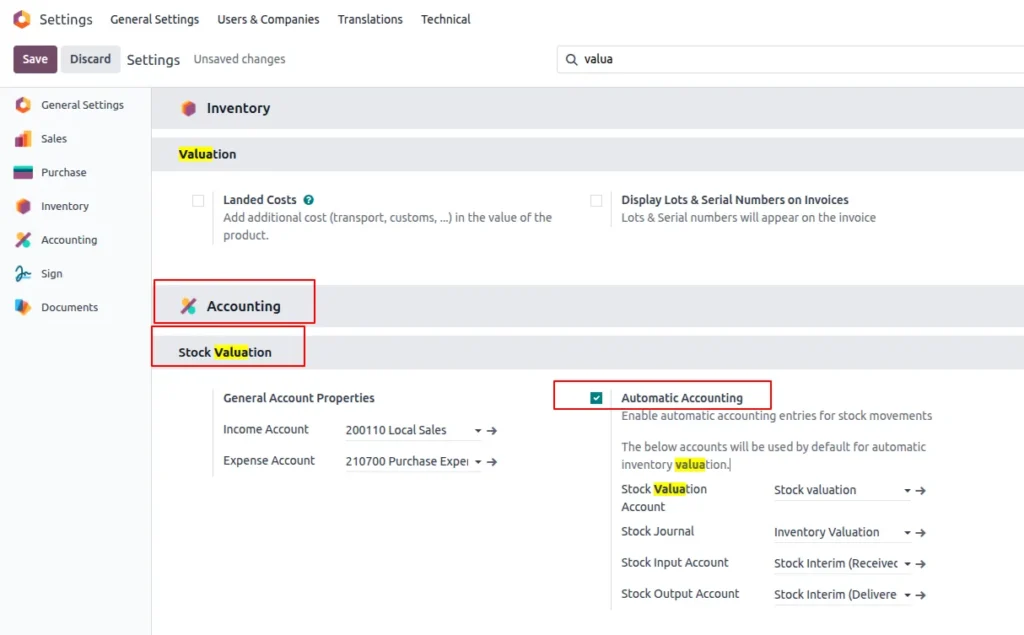
Inventory valuation Configuration in Odoo 18
Can not find inventory valuation in product category in Odoo 18, don’t worry just go to configure First activate Automatic Accounting from Accounting–> setting–> Automatic Accounting and add all the accounts. Then save it.
After saving go back to product category and now you see inventory valuation.
Inventory valuation Configuration in Odoo 19
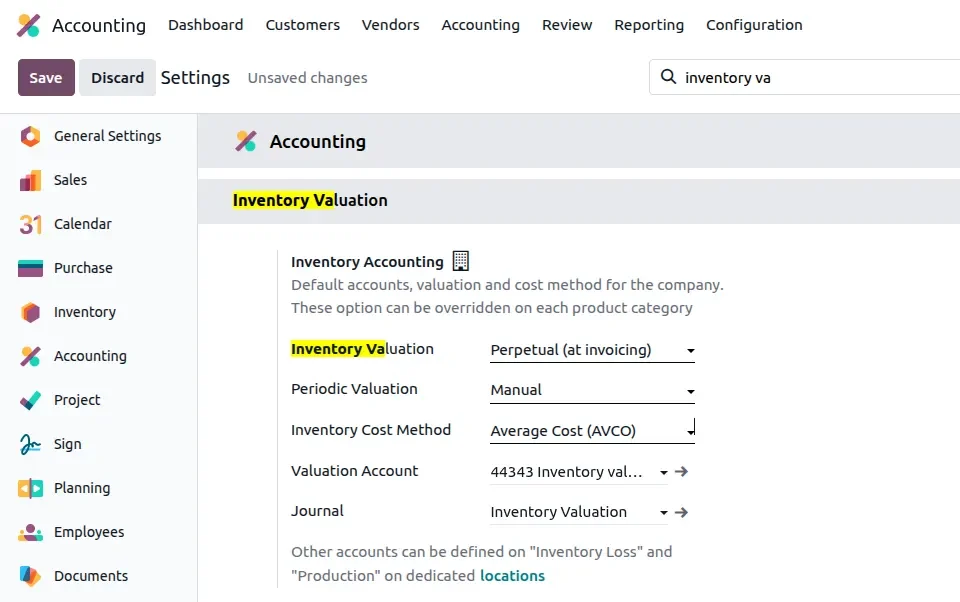
In Odoo 19, you won’t find the “Automatic Accounting” option anymore because it has been replaced by Inventory Valuation. To activate automatic accounting, go to Inventory settings and enable Inventory Valuation instead.
Go to Accounting—> setting—>Inventory valuation and do the below configuration.
Inventory Valuation Methods in Odoo 18 vs Odoo 19
Inventory Valuation method in Odoo 18
Manual: Inventory value is adjusted manually through journal entries.
Automatic: Inventory accounting entries are created automatically for each stock movement.
Inventory Valuation method in Odoo 19
Periodic: Inventory value is updated manually at specific periods.
Perpetual: Inventory value is updated automatically in real-time for every stock move.
Inventory Valuation Accounts
Stock input & stock output account in Odoo 18
If you’ve worked with Odoo 18, you’ll know that in automated inventory valuation there are two key interim accounts under Product Category → Account Stock Properties:
- Stock Input Account: Stock Interim (Received) and
- Stock Output Account: Stock Interim (Delivered).
These interim accounts play a crucial role in how Odoo temporarily records stock value movements before they are posted to the final Inventory Valuation and Cost of Goods Sold (COGS) accounts.
Go to Product category–> open product and add account for stock properties.
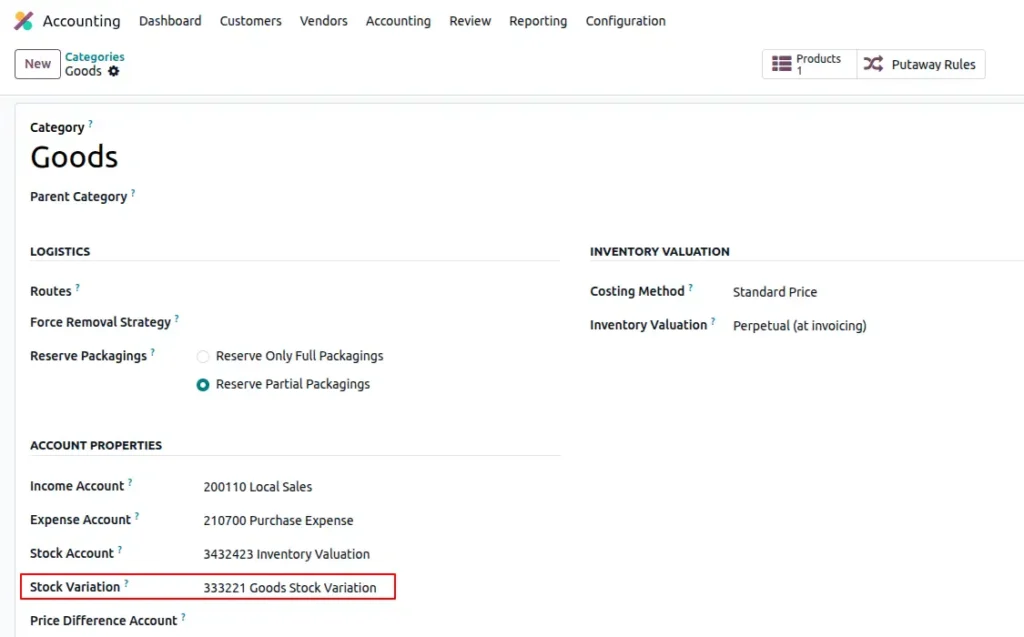
Stock variation account in odoo19
In Odoo 19, the separate Stock Input and Stock Output accounts are replaced by a unified Stock Variation account, which temporarily holds accounting entries for both incoming and outgoing stock movements.
Odoo 19 – New Review Menu in Accounting
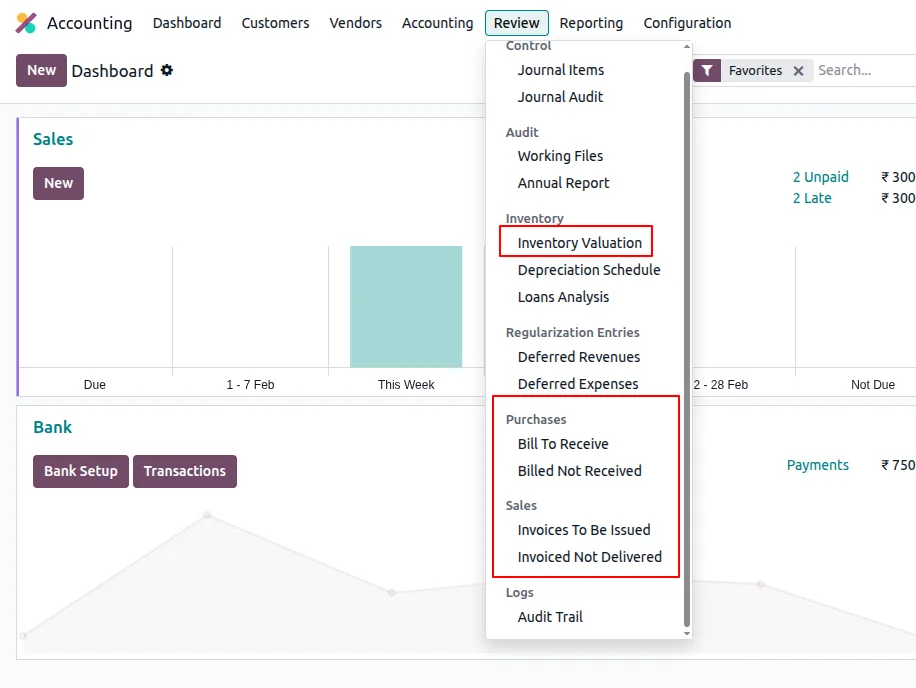
Odoo 19 introduces a new Review menu in the accounting module, where you can monitor key reports related to inventory and invoicing:
- Inventory Valuation Report: Shows stock movements impacting Stock Variation and Inventory Valuation accounts.
- Bills to Receive
Empty: No pending bill available, all received qty is billed.
Has record: Some goods have arrived in your warehouse, but the vendor bill is not yet recorded. Stock exists, but no creditor booked.
- Bills Not Received: Vendor bill recorded but goods not received.
Empty: All vendor bills have been received.
Has record: Some bills are recorded, but the goods haven’t arrived yet. You owe the supplier, but stock hasn’t increased.
- Invoices to Issue: Goods delivered but customer invoice not created.
Empty: All delivered goods have invoices.
Has record: Some delivered goods don’t have invoices yet. Stock is reduced, COGS booked, but revenue not recorded.
- Invoiced Not Delivered: Invoice created but goods not delivered.
Empty: All invoices have been delivered.
Has record: Some invoices exist, but the goods haven’t been delivered yet. Revenue and receivables are recorded, stock and COGS unchanged.
Purchase Order in Odoo 18
To start the process, first create a purchase order and receive the products, but do not create a bill for the vendor.
Example: Product name: iPhone 17 Pro, Total Received qty=5, Cost 70000
When we receive qty it has no impact on the profit and loss, but it has an impact on the trial balance, Jornal entry, Balance sheet.
Trial Balance report after receipt in Odoo 18
- Stock Valuation account is debited by 350,000 (inventory increased).
- Stock Interim (Received) account is credited by 350,000 (temporary clearing balance).
Journal entry after Receiving Product Qty in Odoo 18
The total stock value will be debited to the Stock Valuation account and credited to the Stock Interim account (suspense account).
Purchase order in Odoo 19
Having reviewed the process in Odoo 18, let us now examine the updated flow in Odoo 19 and its overall impact.
First, create a Purchase Order and receive the quantity, but do not create the vendor bill. For example, I received 5 quantities of an HP Laptop (Cost: 50000 each).
In Odoo 19, the flow has changed — there is no concept of a Stock Interim account (Stock Input/Output account) anymore. All stock movements(incoming/Outgoing) are directly reflected in the Stock Valuation account.
In Odoo 19, the flow has changed — there is no concept of a Stock Interim account (Stock Input/Output account) anymore. All stock movements(incoming/Outgoing) are directly reflected in the Stock Valuation account.
After validating the receipt, there is no impact on the Journal Entry, Profit & Loss statement, and no visible change in payable accounts on the Balance Sheet since the bill is not created yet.
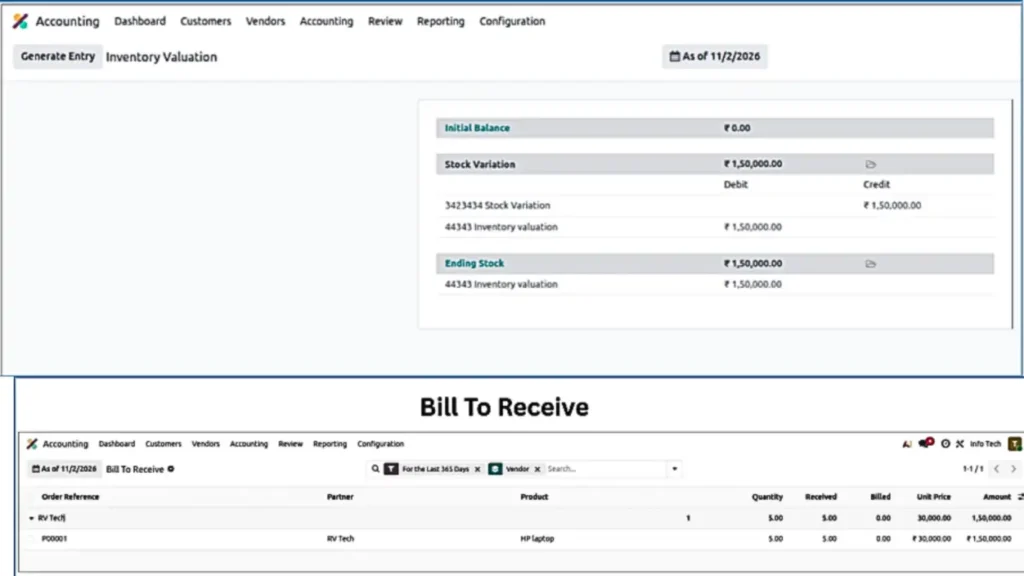
The impact can be seen in Inventory Valuation Report & Bills to Receive under Accounting → Review
In the Inventory Valuation Report, you will see:
- Product: HP Laptop, Quantity Received: +5, Total sale Value: ₹150000
- Accounting Impact:
- Inventory Valuation → Debit ₹150000 because we received 5 qty
- Stock Variation → Credit ₹150000
Inventory Valuation and Bill to received Report in Odoo 19:
The Bill to received report shows one pending record because the purchase Order has been Received but the Bill is still not created.
Deliver products but not create Invoice
Here, we will deliver the product to the customer but will not create the invoice immediately; the invoice will be created later.
Accounting Impact in Odoo 18 after delivery
I have delivered 2 quantities of iPhone to the customer at a selling price of 150,000 each, but I have not created the invoice yet. Let’s review the accounting impact.
You can see the impact in the Trial Balance, but it will not reflect in the Profit and loss because the sales invoice has not been created yet.
Impact Summary:
Open trial balance report to see the changes.
- Stock Interim (Delivered) → Debit 140,000 (cost of 2 qty delivered: 70,000 × 2)
- Stock Valuation →
- Credit 140,000 (on delivery)
- Ending Balance: 210,000 (remaining stock value for 3 qty)
After delivering the product, a journal entry is created where the Inventory Valuation account is credited, and the Stock Output (Stock Interim Delivered) account is debited.
Accounting Impact in Odoo 19 After Deliver the product quantity
To see the impact, we create a Sales Order and deliver the product, but we do not create the invoice.
For example, I delivered 2 HP laptops at a selling price of ₹50,000 each, but the invoice has not been generated yet. In this case, there is no impact on journal entries, the Balance Sheet, or the Profit & Loss statement because revenue is not recognized until the invoice is created.
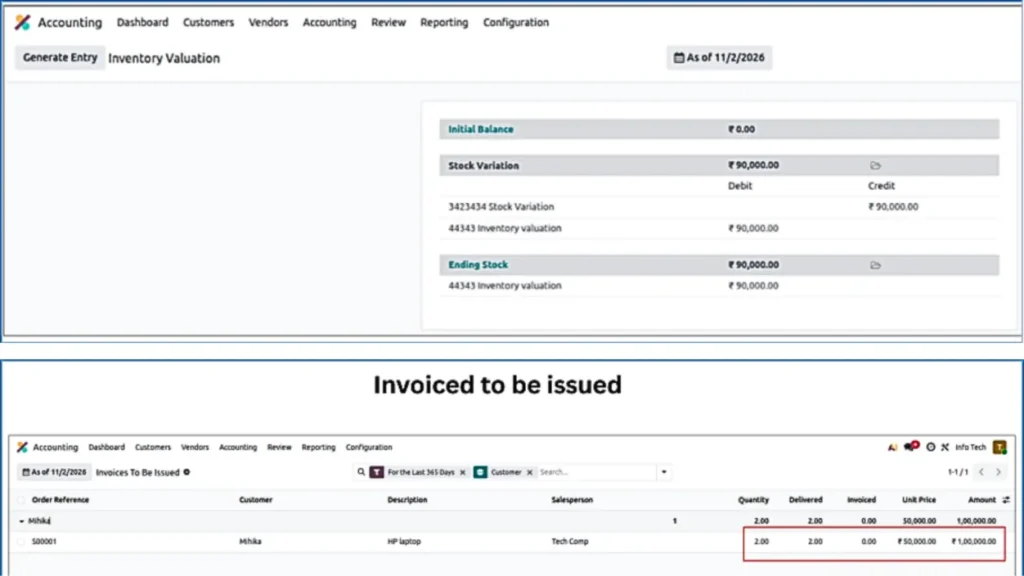
The impact is visible only in the Inventory Valuation Report and the Invoice to be Issued report.
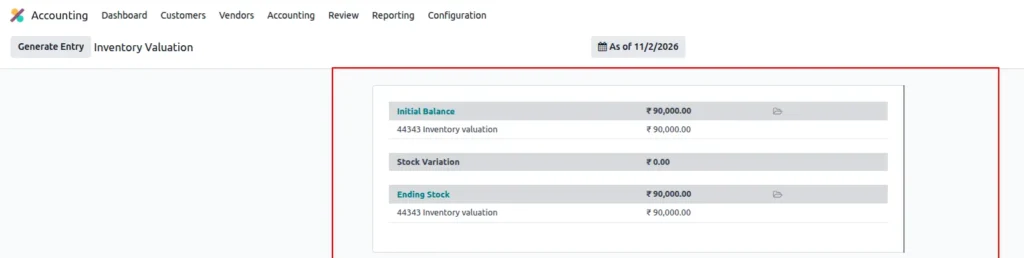
Initially, I had 5 quantities with a cost of ₹30,000 each (total ₹1,50,000). After delivering 2 quantities, the remaining inventory value becomes ₹90,000 (3 quantities × ₹30,000).
In Odoo 19, this change is reflected in the Inventory Valuation Report, where the stock value is adjusted based on the remaining quantity. Additionally, the Invoice to be Issued report shows one pending record because the Sales Order has been delivered but the invoice is still not created.
Inventory valuation and invoiced to be issued report
Create Bill for Received Qty
Now we will create bill for received qty.
Create Bill in Odoo 18
As we know, we have already received 5 quantities, and cost is 70000 but have not created the vendor bill yet. Now, let’s create the bill and review the impact.
After creating the vendor bill, the Balance Sheet, Journal Entry, and Trial Balance will be updated in Odoo 18.
Trial Balance Report after creating bill
Main Vendor Bill Entry in trial balance
- Stock Interim (Received): You will see the same amount on both sides (Debit=credit) Because we have created a bill for the received quantity, so you will find ₹350,000 on both the debit and credit sides.
- Credit → Creditors (Accounts Payable) = 367,500
Create bill in Odoo 19
Uploading the vendor bill will post the accounting entries, impacting the Balance Sheet, journal entries, and payable accounts.
Inventory valuation Report after uploading bill
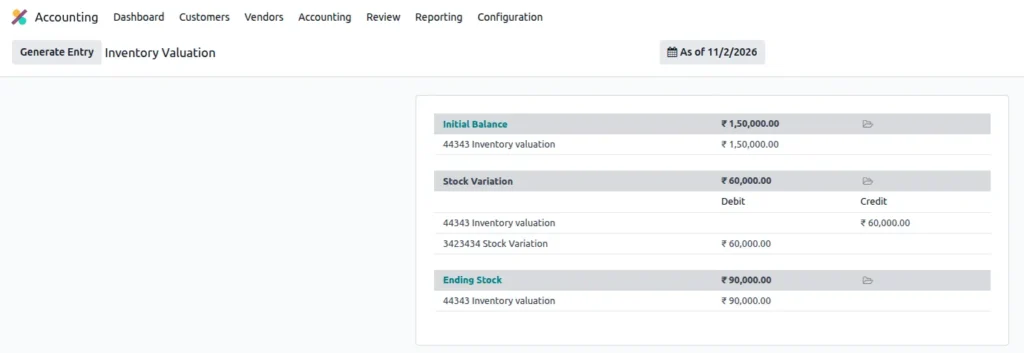
Balance sheet after creating bill
In Odoo 19 Impact can be seen in balance sheet after creating Bill.
Create Invoice for Customer in Odoo
Create invoice in Odoo 18
Now we will create Invoice for the customer for 2 qty with sale price of 150000
You can see the impact in Journal entry, trial balance, Balance sheet and profit and loss
Trial balance after creating invoice in Odoo 18
Net Effect:
- Debtors (Accounts Receivable) = ₹300,000 → outstanding customer payments
- Local Sales Revenue = ₹300,000 → recognized income
After Delivering 2 products: –
- Revenue recognized: ₹300,000
- COGS– 140000
Journal Entry after creating invoice in Odoo 18
- Income account (300,000) → Credited because we have recognized revenue from the invoice.
- Stock Interim – Delivered (140,000) → Credited to remove the value of stock delivered to the customer. This entry is cancelled because we created the invoice for the delivered quantity.
- Purchase Expense (140,000) → Debited to account for the cost of goods sold (COGS) for the product delivered because its Anglo-Saxon-Accounting.
- Debtors (300,000) → Debited to show the amount receivable from the customer.
Balance sheet report after creating invoice in Odoo 18
You will be able to see entry in Receivable account after creating invoice
Profit and Loss report after creating invoice in Odoo 18
In Odoo 18 changes can be notice P&L account after creating invoice
Create invoice in Odoo 19
Once we create the invoice for delivered qty, the journal entries are posted, which impacts the Balance Sheet and recognizes purchase expenses (COGS) after the sale.
Balance sheet impact after creating invoice in Odoo 19
You will notice the changes in Balance sheet in receivable account.
Stock Valuation report after Bill & Invoice in Odoo 19
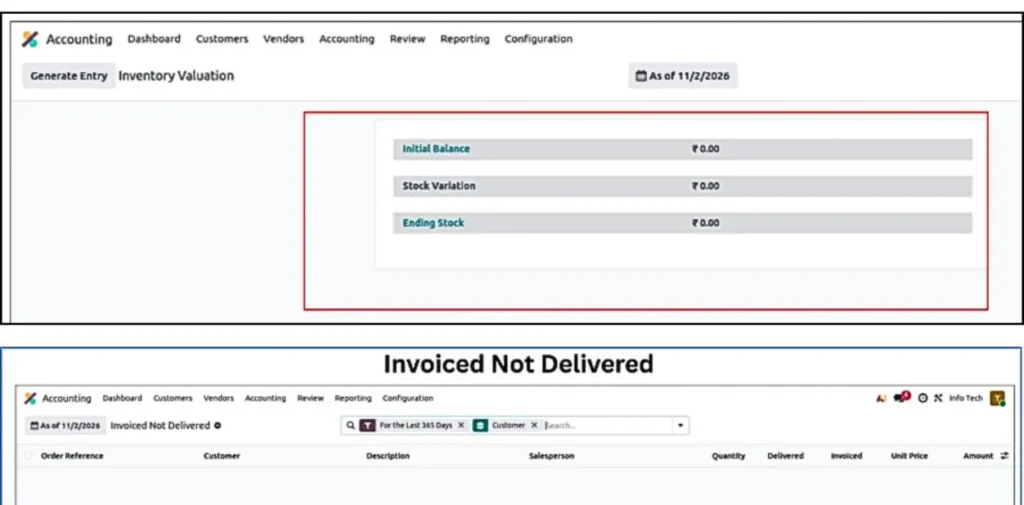
The Stock Variation will remain empty once we create the Bill and Invoice. If it shows zero, it means there are no pending invoices to be created or processed
Create Bill but Not receive Product
Creating bill without receiving product in Odoo 18
In this case we will Create PO–> Bill but not Receive the product
Note: The Control policy should be “on ordered quantities”
Create PO and bill in Odoo 18
So, after creating Bill we will see the account impact in the system
There will no impact in Profit and loss, but you can see impact in Journal entry, Trial balance.
We are purchasing 1 quantity of the product at a cost of ₹70,000.
Trial Balance report in Odoo 18 after creating bill
You will see changes in accounting such as: –
Stock interim (Received): 70000 is debited
Payable account: 70000 is credited
Create Bill Odoo 19
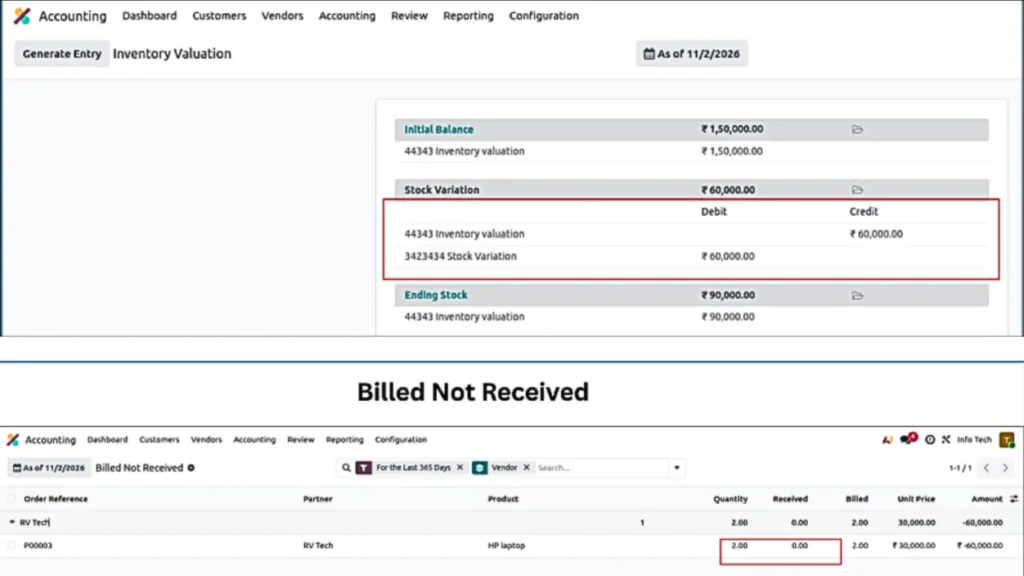
Now, if we will create bill but not receive product.
Product: HP laptop of 2 qty
Cost-30000 per Units
You can see the impact in Inventory valuation report, Billed Not Received report, Balance sheet, Journal Entry.
Bill not received: we have created bill but not received qty that’s why you will see the data in this report.
Create Invoiced but Not Deliver the product
Now we check what will happened if we will create Sale order and invoice but not delivered the product.
Create invoice without creating delivery in Odoo 18
Create invoice for customer but not deliver the product.
Here we are creating invoice for 3 qty with sales price 150000.
Journal entry Report:
- Income account (450,000) → Credited to recognize revenue from selling 3 units.
- Stock Interim – Delivered (210,000) → Credited to remove stock delivered to the customer (now cleared because invoice is created).
- Purchase Expense / COGS (210,000) → Debited to record the cost of goods sold for 3 units.
- Receivable account (450,000) → Debited to reflect the amount receivable from the customer (invoice created).
Trial Balance Report
You will see major impact in COGS, Receivable account, and Stock interim(delivered) account.
Create invoice in Odoo 19 without deliver the product
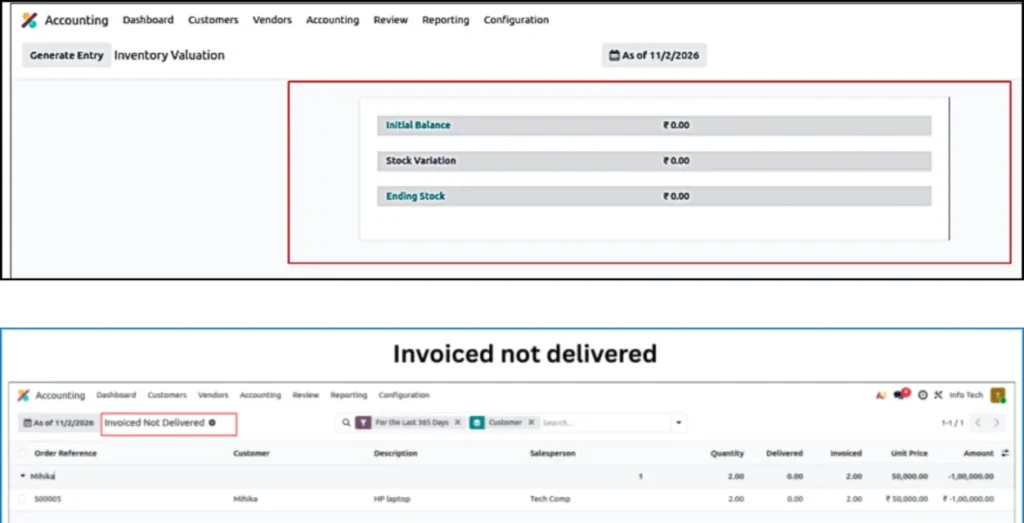
Now create invoice but not delivered to customer
Creating for 2 qty with selling price 50000
Now you can see its impact on Balance sheet, Inventory valuation, Invoiced Not delivered report
Stock variation is zero because we have created invoice because we don’t have the stock which invoice is pending. So, you can see pending SO which delivery is not completed under Invoiced not delivered section.
Inventory valuation report & Invoiced not delivered report
You can check pending delivery orders in Invoiced Not delivered report under review menu in accounting.
Receive the product
Receive products in Odoo 18
Now we will receive the products for which we have previously created the bill.
Receive bill for 1 qty and its cost is 70000
Now, if you check the trial balance, you will notice that all the amounts are cleared(cancelled) in stock input account because there are no pending products to receive for which the bill has already been created.
Our final entry will be Debit= Credit
Receive products in Odoo 19
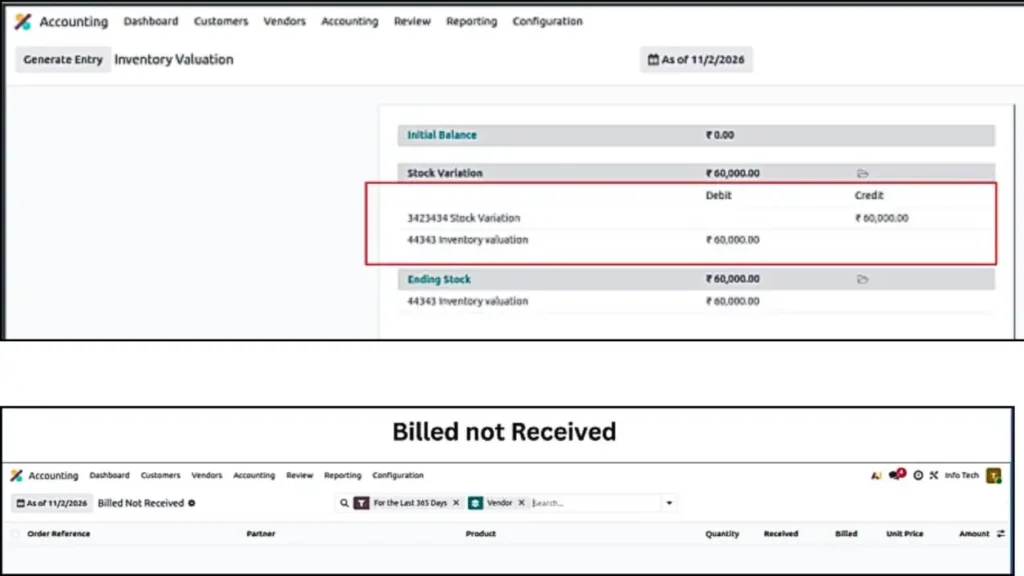
After receipt, the impact will be reflected in the Inventory Valuation report, and the Billed Not Received report will be empty.
Billed not Received Report After Receiving product
Note: You will see nothing in “Billed Not Received” because there are no pending bills at the moment. If there were any pending bills, the data would be displayed here.
Deliver the product
Now we will Deliver the products for which we have previously created the Invoice.
Deliver product for Invoiced quantity in Odoo 18
Validate the delivery
Trial Balance Report
Now, if you check the trial balance, you will notice that all the amounts are cleared (cancelled) in stock output account because there are no pending products to deliver for which the invoice has already been created.
So, the entry will be Debit=Credit in Stock output account
Deliver Product for Invoiced qty in Odoo 19
Now deliver the product
After delivery, the impact can be seen in the Inventory Valuation Report and in the Invoiced Not Delivered report. If the report shows no records, it means there are no pending invoices, no stock to be delivered.
Comparison Odoo 18 Vs Odoo 19
| Feature / Concept | Odoo 18 (Standard/Anglo-Saxon) | Odoo 19 (Perpetual/Modern) |
|---|---|---|
| Primary Setting | Accounting → Settings → Automatic Accounting | Accounting → Settings → Inventory Valuation |
| Valuation Terms | Manual vs. Automatic | Periodic vs. Perpetual |
| Interim Accounts | Uses two: Stock Input (Received) & Stock Output (Delivered) | Uses one: Unified Stock Variation account |
| Real-Time GL Impact | Journal Entries are created immediately upon Receipt/Delivery. | Journal Entries are created only after Bill/Invoice is posted. |
| Tracking Tool | Relies on Trial Balance / General Ledger for Pending invoice, bill, pending receipt, pending delivery | New Review Menu (Dashboard for reconciliation). |
Odoo 18 Inventory Valuation
Odoo 19 Inventory Valuation
Conclusion
After reviewing the complete comparison, it is clear that Odoo 18 and Odoo 19 handle inventory valuation with different accounting structures. Odoo 18 follows a traditional interim-account model using separate Stock Input and Stock Output accounts, where the accounting impact is distributed across receipt, delivery, and billing stages.
Odoo 19 restructures this logic by introducing the Stock Variation account and a more centralized monitoring approach through the Review menu. Reports like Bills to Receive and Invoices to be Issued provide clearer tracking of pending transactions.
Overall, Odoo 19 simplifies the accounting framework, improves visibility, and makes inventory valuation management more controlled and transparent compared to Odoo 18.

Gangeshwari Netam is an Odoo Functional Consultant with a strong passion for business process optimization and ERP solutions. With hands-on experience in Odoo implementation and functional analysis, she helps businesses streamline operations and improve efficiency through smart, scalable solutions.