
Migrating to Odoo ERP is a strategic move for businesses aiming to streamline operations, improve data accuracy, and gain real-time visibility across finance and inventory. However, Odoo ERP migration is not just about transferring data, It’s about ensuring financial integrity, accurate stock valuation, and uninterrupted business operations.
Finance, inventory, and stock valuation are the most critical components of any ERP migration. Errors in these areas can lead to financial discrepancies, compliance issues, and operational disruptions.
In this comprehensive guide, we’ll walk you through a step-by-step Odoo migration process, including strategy, data preparation, validation, and post-go-live best practices.
Understanding the Migration Strategy
A successful ERP migration starts with a clear and structured strategy. Without proper planning, businesses risk data inconsistencies, reporting errors, and downtime.
Key Objectives of Migration
- Data Accuracy: Ensure correct financial balances, AR/AP, and inventory valuation
- Audit Trail Continuity: Maintain historical traceability for compliance
- Operational Continuity: Avoid disruption to daily business activities
Migration Approaches
When considering migration, businesses typically choose from three approaches:
| Approach | What to Migrate | Pros | Cons |
|---|---|---|---|
| Opening Balance Migration | Migrate only trial balance, AR/AP, and stock values | Fast and clean implementation | No historical reporting |
| Full Historical Migration | Migrate all transactions (journal entries, stock moves) | Complete data history | Complex, time-consuming, high error risk |
| Hybrid Approach (Recommended) | Summary for past years + detailed current year | Balanced approach; reduces risk | Requires planning for historical summaries |
Recommendation: For most businesses, a hybrid approach provides the best balance between system cleanliness and historical continuity. It allows Odoo to start with accurate opening balances while preserving critical data for the current fiscal year.
Upgrades Vs Migration in Odoo
| Aspect | Upgrade | Migration |
|---|---|---|
| Definition | Move to newer Odoo version | Move from another system or older version |
| Example | Odoo 18 → Odoo 19 | Tally → Odoo |
| Focus | Version update | Data transformation & accuracy |
| Complexity | Low | Medium-High |
Odoo Migration Planning Checklist
- Before starting your migration, ensure you have:
- Identified your legacy system (Tally, SAP, QuickBooks, etc.)
- Assessed finance and inventory workflows
- Defined required features (multi-currency, costing method, valuation)
- Listed integrations (banking, POS, eCommerce, APIs)
- Cleaned master data (COA, products, warehouses)
- Set a migration cut-off date
- Assigned roles to finance and inventory teams
- Identified risks like stock mismatches or data duplication
Step-by-Step Odoo Migration Process
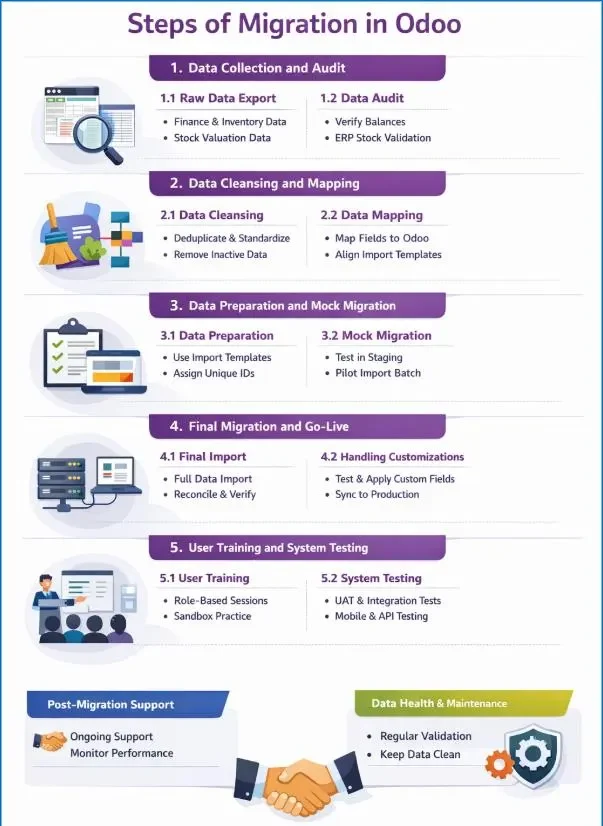
Data Collection and Audit
This phase focuses on extracting financial and inventory master data from your legacy system and performing a meticulous audit to ensure that all balances, stock counts, and accounts are correct. This creates the “single source of truth” for migration.
Raw Data Export
Export all relevant data into Excel/CSV from the legacy ERP. Expect unstructured data; cleaning will follow.
Contacts
- Customers
- Vendors
- Addresses
- GST / Tax details
Finance Master Data
- Chart of Accounts, Trial Balance (for opening balance), Account Types
- Tax Structures: GST, TDS, VAT, Fiscal Positions
- Journals: Sales, Purchase, Bank, Cash
- Bank Accounts, Currencies, Payment Methods, payment terms
- Open Invoices, Open Bills for Accounts Receivable & Accounts Receivable
Inventory Master Data
- Products, Categories, Product Types
- Warehouses, Locations, Routes
- Units of Measure (UoM)
- Stock Valuation Data: Costing Methods (FIFO, AVCO, Standard), Valuation Accounts, Price Difference Accounts
- Landed Cost Types
Data Audit
Finance: Verify Trial Balance: Debits must equal Credits, Match bank balances against statements. Validate AR/AP balances for completeness.
Inventory: Confirm physical stock matches system counts, purge inactive products, accounts, or vendors that are not required for migration.
Inventory valuation: check stock value (Qty × Cost), costing method, inventory valuation report vs GL balance, negative stock impact, landed cost application, and price difference entries are all accurate and aligned.
Data Cleansing and Mapping
Once data is extracted, it must be refined and aligned with Odoo’s standards to prevent errors during import.
Data Cleansing
Finance: Remove duplicates, standardize GST/tax IDs/addresses/phone, translate payment terms and financial categories, validate AR/AP, and remove inactive accounts.
Inventory: Deduplicate SKUs/products, fix UoM, remove inactive products and dead stock, and standardize product categories and warehouse structure.
Stock Valuation: Fix zero-cost items, ensure accurate product cost, remove valuation-impacting items, and align costing methods (FIFO/AVCO/Standard).
Data Mapping
Finance: Map legacy COA (Assets, Liabilities, Equity, Income, Expenses), taxes, journals, payment terms, and financial categories to Odoo.
Inventory: Map products, categories, warehouses, locations, routes, multi-warehouse structure, and UoM to Odoo.
Stock Valuation: Map costing method, valuation accounts, price difference accounts, stock accounts, landed cost, and automated/manual valuation, and decide valuation method.
Additional: Identify gaps for custom fields/workflows (multi-warehouse tracking, automated stock valuation).
Handling Customizations
Implement custom fields or workflows in a staging environment first.
Pro Tip: Accurate mapping ensures that stock values, journal entries, and AR/AP balances post-migration match legacy data exactly.
Data Preparation and Mock Migration
Before full migration, data is prepared in Odoo-ready templates and validated in a staging environment.
Data Preparation
Finance: Use Odoo templates, assign unique IDs, format dates (YYYY-MM-DD), prepare opening Trial Balance (Assets, Liabilities, Equity), prepare AR invoices (Customer, Invoice No, Date, Due Date, Amount), prepare AP bills, prepare bank opening balances, configure taxes (GST Input/Output, reverse charge), and ensure debits equal credits. Prepare asset register (Asset Name, Purchase Date, Gross Value, Accumulated Depreciation, Remaining Life).
Inventory: Prepare product data (Product Name, SKU, UoM), prepare quantity per location, define warehouse/location structure, prepare multi-warehouse stock, and prepare serial/lot tracking data.
Stock Valuation: Decide valuation method (FIFO/AVCO/Standard), prepare product cost, configure valuation accounts, ensure Stock Value = Qty × Cost, and prepare reconciliation for GL vs inventory value.
Other: Prepare customer, Vendor data file if not imported
Mock Migration
Finance: Import small batch, test opening Trial Balance via journal entry, Localisation Packages, currencies, validate AR/AP invoices, test journals and payment terms, verify bank account creation and opening balances, validate tax mapping, and ensure Trial Balance matches. Test asset import and validate depreciation schedule.
Inventory: Test stock quantity migration using Inventory Adjustment, upload Product-Location-Quantity, validate location-wise stock, test multi-warehouse quantities, and test serial/lot imports.
Stock Valuation: Test manual vs automated valuation, set product cost, validate Stock Value = GL account, test inventory valuation calculation, and pass sample valuation journal entry if mismatch.
Common Validation: Import 5–10 records in staging, detect syntax errors, validate balances and stock quantities, and correct mapping/template issues before full import.
Tip: For inventory, also simulate stock valuation calculations to confirm that automated costing methods (FIFO/AVCO/Standard) yield correct values.
System Testing
Ensuring the team can operate the system correctly is critical to avoiding operational disruptions.
User Training
- Conduct role-based sessions for Finance, Inventory, and Operations teams.
- Use a sandbox environment for hands-on practice with AR/AP posting, stock transfers, and journal entries.
- Provide quick reference guides for common tasks like posting invoices, reconciling stock, or adjusting stock values.
- Offer post-launch office hours for questions and immediate troubleshooting.
System Testing
- Sales Cycle: Lead to payment flow testing.
- Purchase Cycle: RFQ to payment flow testing.
- Inventory Movement: Receipts, deliveries, transfers testing.
- Accounting Entries: Verify auto journal entries from all flows.
- Stock Valuation: Costing method and valuation entries validation.
- UAT: End-to-end testing for sales, purchase, stock movement, and depreciation posting.
- Integrations: Test APIs, barcode scanners, and bank feeds.
- Data Check: Spot-check stock quantities, product costs, and AR/AP balances.
Freeze Old System
- Stop all transactions in the legacy system (Sales, Purchase, Inventory, Accounting).
- Inform users about system freeze and restrict access.
- Close all pending documents (draft SO, PO, invoices, receipts).
- Reconcile stock quantities and financial balances before freeze.
- Take final full database backup of the old system.
- Lock the legacy system and proceed with final migration.
Pro Tip: Include automated stock valuation tests during UAT to confirm that the inventory valuation aligns with GL accounts.
FinalOdooMigration
After final backup, import validated finance, inventory, stock valuation, and fixed asset data into production, verify balances, and proceed to go-live.
Final Import
Finance: Import full finance dataset (COA, journals, payment terms, bank accounts), import Opening Trial Balance ensuring Debits = Credits, import AR/AP balances, reconcile Trial Balance, and validate bank balances.
Inventory: Import product master, import stock quantities, validate location-wise stock, confirm stock on hand, and update PO and stock move sequences.
Stock Valuation: Import costing method, import product cost, confirm stock valuation, ensure Inventory Valuation = GL Stock Account, and validate price difference and valuation accounts.
Fixed Assets: Import asset register, validate asset values, and configure depreciation schedule.
Common Checks: Confirm AR/AP balances, stock quantities, and stock valuations, and update invoice, PO, and stock move sequences for continuity.
Validation Phase
Financial Validation
- Finance: Trial Balance match, AR/AP match, bank balance match, tax configuration validation, and payment terms verification.
Inventory Validation
- Inventory: Stock quantity match, location-wise stock validation, serial/lot validation, and Stock on Hand report verification.
- Stock Valuation: Stock valuation match, product cost validation, costing method validation, and Inventory Valuation report verification.
Reports to check:
- Inventory Valuation
- Stock on Hand
Reconciliation
Stock Valuation: Stock vs GL reconciliation, Inventory Valuation vs Stock Account match, and price difference account validation.
Finance: Tax reconciliation, GST input/output validation, and bank reconciliation.
Inventory: Quantity mismatch reconciliation across warehouses and negative stock validation.
Post-Migration Support andUser training
Even after go-live, maintaining data integrity and system stability is crucial.
Support
Support: Provide dedicated support for at least first month, monitor system performance, fix errors quickly, gather user feedback, and gradually enable advanced features like automated reordering and multi-warehouse.
Data Health and Maintenance: Perform regular AR/AP and stock valuation validation, maintain naming conventions, monitor integrations, and schedule periodic stock vs GL reconciliation.
Post Go-Live Activities: Daily reconciliation, stock movement validation, issue fixing, adjust entries, and correct master data.
Common Odoo Migration Mistakes to Avoid
- Migrating dirty or duplicate data.
- Wrong costing method or missing product cost.
- Ignoring stock valuation and GL reconciliation.
- Incorrect tax, UoM, or master data mapping.
- Not freezing old system before final migration.
- Importing unnecessary historical data instead of open balances.
- Skipping UAT and multi-warehouse validation.
- Ignoring negative stock and price difference impact.
Expert Tips for Successful Odoo Migration
- Perform at least two mock migrations and test in staging.
- Maintain mapping sheets and reusable migration templates.
- Freeze configuration and old system before final migration.
- Validate stock vs GL and AR/AP before go-live.
- Import only cleaned data and open transactions.
- Use small batch testing and keep rollback backup ready.
Read Also:
Common Mistakes to Avoid During Odoo ERP Implementation
Odoo ERP Implementation Methodology: Major Phases and How It Functions
Conclusion
A successful Odoo ERP migration depends on careful planning, accurate data handling, and thorough validation – especially in finance, inventory, and stock valuation.
By following a structured approach – from data audit and cleansing to testing and reconciliation you can ensure:
- Accurate financial reporting
- Reliable inventory tracking
- Seamless business operations
The hybrid migration approach offers the best balance between historical data and system performance, helping businesses scale efficiently with Odoo.
Remember: ERP migration is not just a technical process—it’s a business transformation. Investing time in planning and testing today prevents costly errors tomorrow.
Ready to migrate to Odoo ERP without the risk of data errors or operational disruption? At Techvaria, we specialize in seamless Odoo migration for finance, inventory, and stock valuation ensuring accuracy, compliance, and business continuity at every step. Whether you’re upgrading from an older Odoo version or moving from systems like Tally or SAP, our experts will guide you through a smooth and efficient transition.
Book your free consultation today or reach out to us at info@techvaria.com to start transforming your business with Odoo.

Gangeshwari Netam is an Odoo Functional Consultant with a strong passion for business process optimization and ERP solutions. With hands-on experience in Odoo implementation and functional analysis, she helps businesses streamline operations and improve efficiency through smart, scalable solutions.